
 Facebook
  Twitter
  LinkedIn
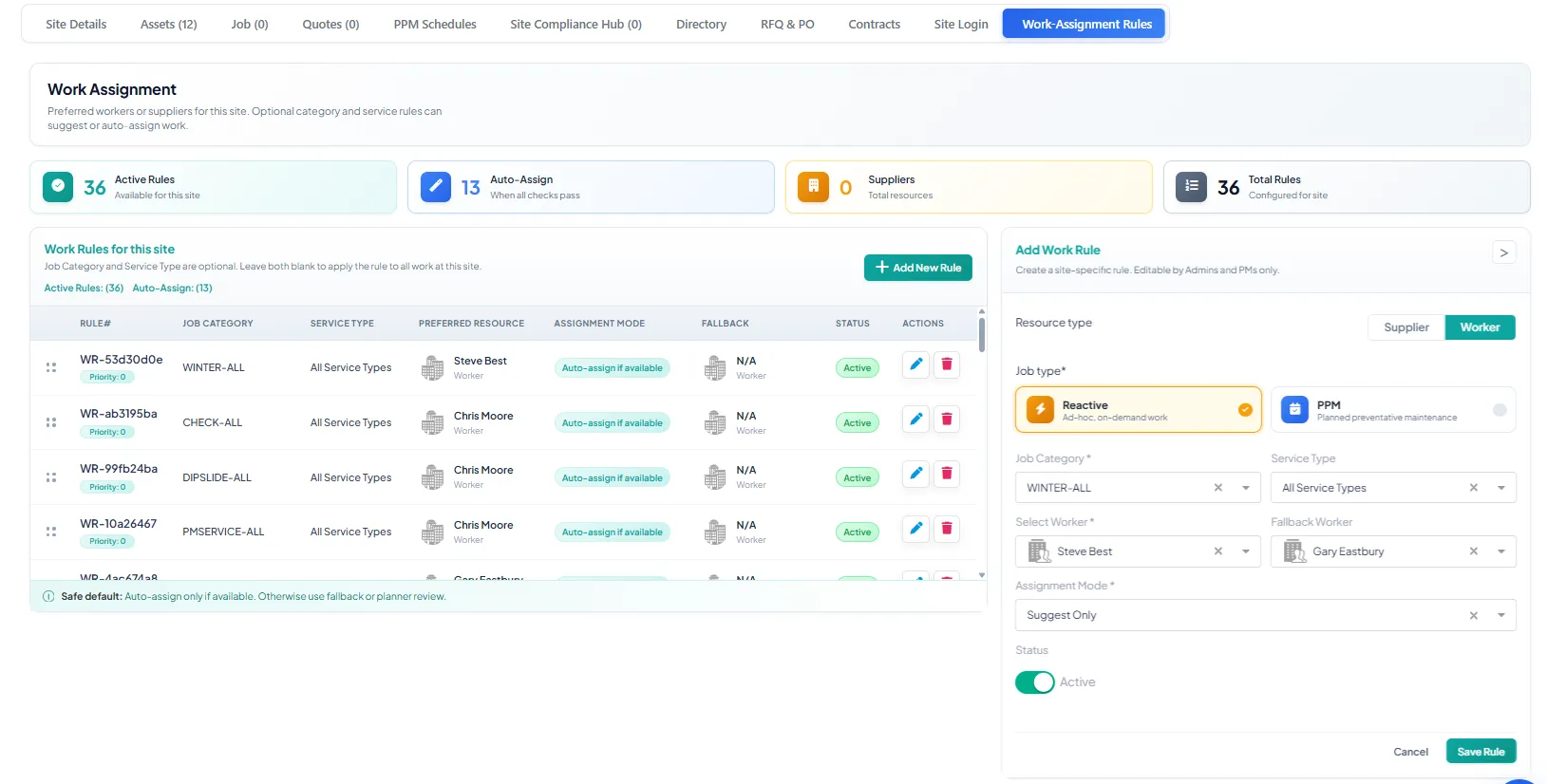
 Work Assignment Rules are used to define which worker or supplier should be assigned to a job based on the selected client, site, job type, job category, and service type.
These rules can be configured at both Client and Site level. Once the required rule details are added, the system uses them to suggest or assign the correct resource for Reactive and PPM work.
Where to Configure Work Assignment Rules
Work Assignment Rules can be managed from:
Client Profile
Site Profile
The Work-Assignment Rules tab is available within the Site/Client profile. This allows users to create rules that apply specifically to that site or client.
How Work Assignment Rules Work
When a job is created, the system checks the configured rules and matches the job details with the rule conditions.
The rules are based on:
Resource type (Worker/Supplier)
Job type (PPM/Reactive)
Job category
Service type
Preferred worker or supplier
Fallback worker or supplier
Assignment mode
Status
If the job matches the rule, the system will assign or suggest the selected resource according to the assignment mode.
Preferred Resource
The preferred resource is the main worker or supplier selected for the rule. If the job matches the rule, this resource will be used for assignment or suggestion.
Job Type
The rule can be created for:
Reactive
Used for ad-hoc or on-demand work, such as faults, repairs, and urgent issues.PPM
Used for planned preventative maintenance work.
Job Category and Service Type
The Job Category and Service Type help the system decide when the rule should apply.
If a rule is created for a specific category and service type, it will only apply to jobs matching those details.
If category or service type is left blank, the rule can apply more generally, depending on the configuration.
Fallback Resource
The fallback resource is used when the preferred worker or supplier is not available or cannot be assigned.
This helps ensure the job can still be reviewed or assigned without delay.
Rule Status
Each rule can be marked as Active or inactive.
Only active rules are used by the system for assignment or suggestion.
Assignment Mode
Assignment Mode controls how the system applies a Work Assignment Rule.
Auto-assign if available
The system automatically assigns the preferred worker or supplier within 5 minutes of job creation, provided they are available and the job matches the rule.
Suggest Only
The system does not assign the job automatically. It only shows the preferred and fallback worker or supplier as suggestions at the top of the assignment screen. The planner can then manually select the suitable resource.
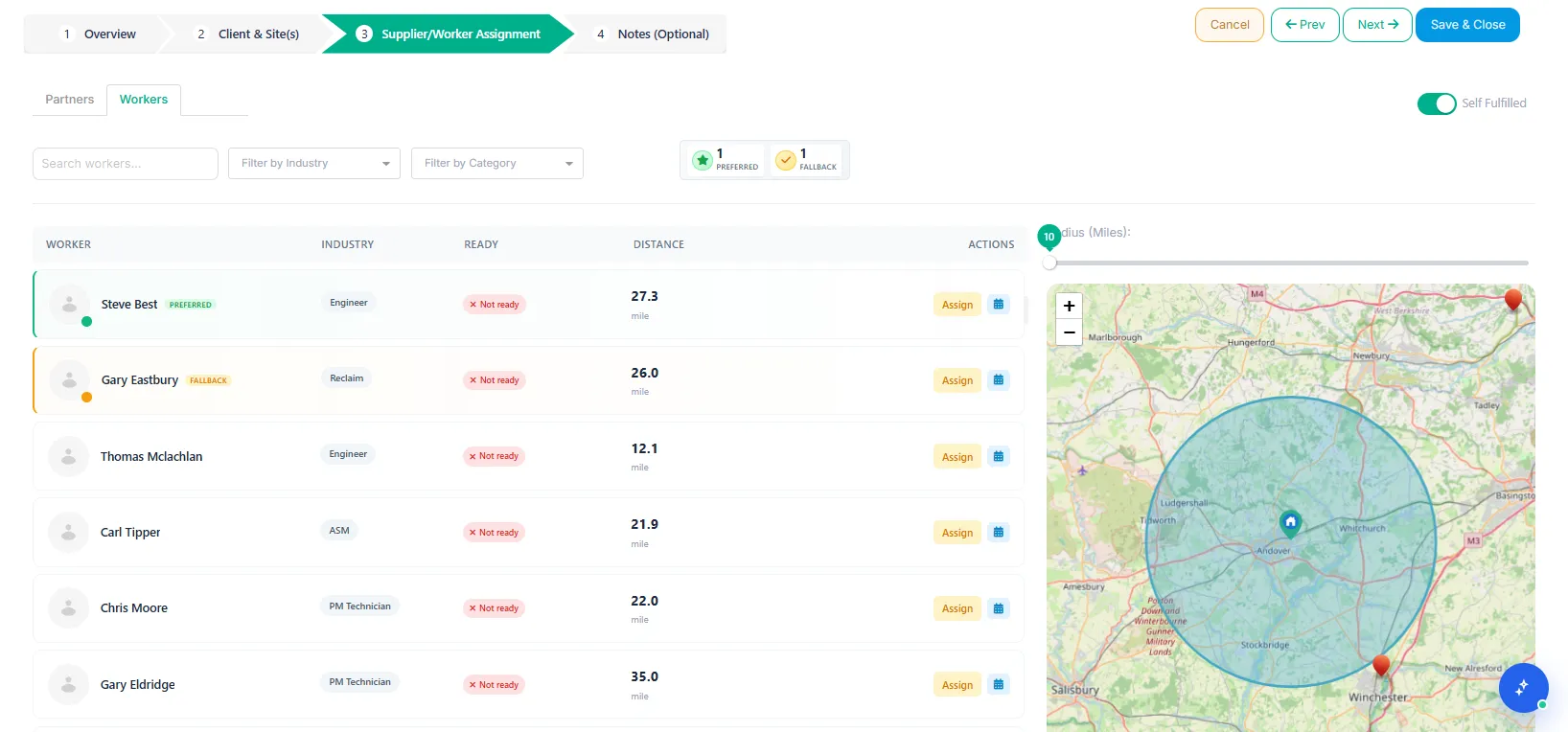
If no suggested resource is selected and an Auto-assign rule exists for the same site or client with matching rules, the system will assign the worker or supplier based on that rule within 5 minutes of job creation.
Creating a Work Assignment Rule
To create a new rule:
Open the required Client Profile or Site Profile.
Go to the Work Assignment Rules tab.
Click Add New Rule.
Select the Resource Type:
Supplier
Worker
Select the Job Type:
Reactive
PPM
Select the Job Category.
Select the Service Type.
Select the preferred Worker or Supplier.
Select a Fallback Worker or Fallback Supplier, if required.
Select the Assignment Mode.
Set the rule status as Active.
Click Save Rule.
Notes
Work Assignment Rules can be configured for both Sites and Clients. However, if rules are added at both levels, the Site-level rule will take priority.
If a rule is configured only at the Client level, it will automatically apply to the client’s sites where no Site-level rule exists..